The DFS output data from simulations will be stored in the local unit system. (This implies that model setups can readily be exchanged between users using different localized work environments).
Where data in DFS files are supplied as input data files, the input data may in most cases be supplied in a unit of the user's choice. The system will in this case enforce that a certain item type it used for the data - and as a consequence of this that only certain subset of units can be chosen.
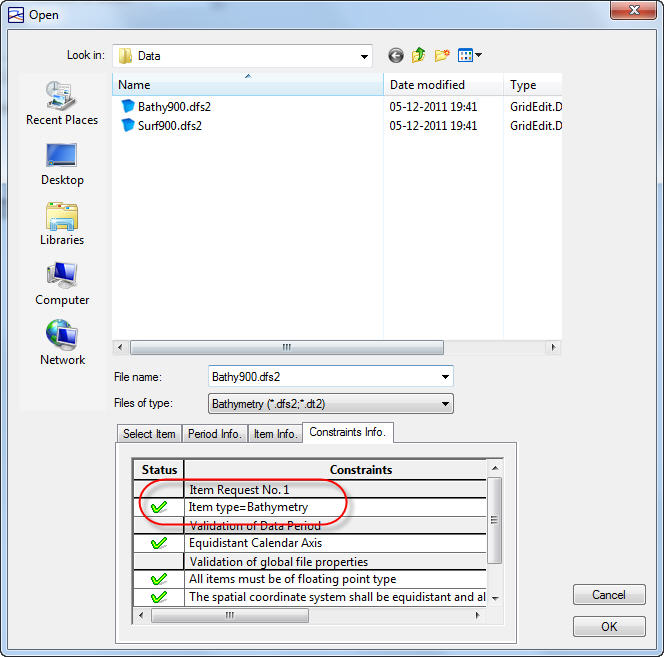
An example of this is a MIKE 21 bathymetry file, where the item type must be "Bathymetry", see Figure 4.7. The allowed units for item type “Bathymetry” is meter, centimeter, millimeter, feet, feet US, inch and inch US, see Figure 4.8. This is to ensure that the input data can be correctly converted to the unit used internally during the simulation.
Figure 4.7 Selection of a MIKE 21 bathymetry
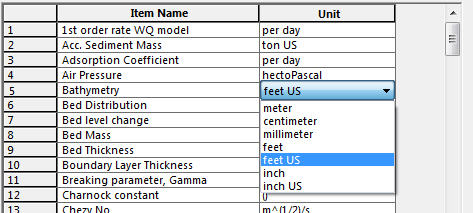
Figure 4.8 Allowed units of the item type “Bathymetry”

PLEASE NOTE:
If you have a model setup created with an earlier version of MIKE and input data in DFS files do not have the correct item type, the validation will typically display an error saying that the input file is not valid.
