When specifying an output data file name in a model setup you can specify the name by a local or an absolute name:
· Local name
If the output data file name is defined as a local name in the setup, i.e. without an absolute path, the generated files are saved in a generic Result Folder.
· Global name
If the output data file name is defined by an absolute path, the files are save accordingly.
Per default the editors may be designed for local file names, however you can use the command Ctrl-D on the entry field to define a global output data file name with an absolute path.
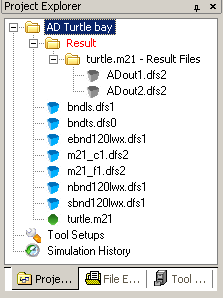
When a MIKE Zero project is active in the MIKE Zero shell, a folder of Folder type Result defines the default location of the output data folders from various model setups stored in the project. The folder is per default displayed in the Project Explorer by a unique font color, see Figure 4.10.
Figure 4.10 Result folder as displayed in Project Explorer
If a model setup with local defined output data file names is executed from outside a MIKE Zero Project, the output sub folder is placed by the model setup.
