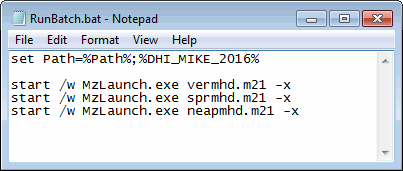
Figure 5.5 File for batch execution of MIKE 21 Flow Model.
From a command prompt the usual syntax for a launching model engine is:
MzLaunch [model input file] [options]
where ‘Model Input File’ is the full path to the model input file. If this is omitted, the tool will start prompting you for a name of model setup file. The MzLaunch utility will utilize the default model engine related to the extension of the setup file (see Engine). If you want to use an alternative engine you may write the name explicitly. The default CPU priority of the simulation is ‘Normal’, however using e.g. the option ‘-y 2’ you can specify the priority to be ‘Below normal’. The option ‘-run’ will cause the model to run in silent mode.
A full list of the all options is available when executing ‘MzLaunch -h’ from a command prompt.
If you have prepared a number of model input files, and want to carry out several simulations in a row you can create an ASCII batch file containing the prompts for each simulation, as shown in Figure 5.5 and Figure 5.6.
It is also possible to launch toolbox engines by using the syntax:
toolboxshell -run [toolbox input file]
and generate graphics files using plot objects by using the syntax:
MzPlotCompApp [plot composer input file] -printtofile [-options]
For more information regarding plotting graphic files in batch pls. see the documentation for Plot Composer.
