The Groundwater leakage page defines the groundwater head and leakage coefficients such that an additional loss of water from the river (to the groundwater) can be included in the simulation. Include the leakage in the simulation by activating the ‘Include groundwater leakage’ tick-mark on the top of the page.
Leakage coefficients may be defined by an overall global leakage coefficient or by local coefficients that overrides the global value at specific locations. Hence, if leakage is to be included only at some locations, then a global value of 0 must be defined and the local reaches where groundwater leakage takes place must be defined in the Local values table.
Input type
Here you select from the drop-down menu whether the head elevation is constant or varies in time during the simulations. The respective options are:
· Constant
· Time varying
This choice also determines how the input value or files are entered.
Value
Head elevation, used for Constant input type.
For Time varying input type, a time series file must be specified. The button to the right may be used to either browse, create, edit or plot the time series.
Item
This field shows the selected item in the time series.
Global value
The global value of the leakage coefficient is defined here.
Local values
By using local values of the leakage coefficient it is possible to adjust the leakage to reflect local variations of soil characteristics within the domain. Local values overwrite the global value.
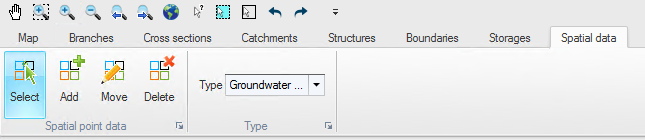
Local values are applied at specific locations defined by Branch name and Chainage. Distributed values are added or deleted using the Append '+' or Delete '-' buttons above the table. Alternatively, distributed values can be digitised in the Map view: in Map view, open the Spatial data ribbon and select 'Groundwater leakage' from the 'Type' drop-down menu (see Figure 12.5).
Figure 12.5 Map view ribbon for editing local Groundwater leakage
Click on the 'Add' button to activate creation of new locations of groundwater leakage coefficients and click on the desired location in the river network. The location will automatically be added to the table of local values in the tabular view and a value may be entered. The 'Move' and 'Delete' buttons may also be used to edit the location on the map or to remove a local value.

Note: If two or more local values are defined in the same river branch, the intermediate value(s) will be calculated by linear interpolation.
