ID
String identification of the boundary.
Type
Boundary Type specifies the kind of data required for the boundary. This choice also affects the Location type entry that follows.
Available options are:
· Water level: The Water Level boundary type is specified when a time-varying or constant water level condition is required (for the HD model).
· Discharge: A Discharge boundary is specified when a time-varying or constant flow hydrograph condition is required (for the HD model). Positive discharge values are considered as inflows entering the model, whereas negative values are considered as abstractions of water from the model
· Q/h relation: A Q/h relation boundary is specified when the relationship between the discharge and the water level is known for the HD model).
· Free outflow: When the Free outflow type is applied, the smallest of the critical and the natural depth is applied at the boundary
· Closed. The Closed boundary Type is used at free end points of the model domain where a zero flux condition across the boundary is applicable. It corresponds to zero transport across the boundary. No additional information is required except the location.
· Rainfall. Rainfall boundary type is specified in river reaches where the inflow of rainfall is to be represented. Rainfall can be specified globally or as a distributed source per branch.
· Evaporation. The Evaporation boundary type is specified in river reaches where loss of water by evaporation is to be modelled. Evaporation can be specified globally or as a distributed source per branch.
· Runoff. This boundary type is only available when using the Advection-Dispersion module in combination with a Hydrodynamic and Rainfall-runoff simulation. This type allows assigning a solute concentration to the runoff from a catchment, this runoff's quantity and location being defined in the River links menu
Location type
This input depends on the option selected as boundary type and is active for only some of them.
The available options are:
· Open: An Open boundary applies to the free upstream or downstream end of the model domain. A boundary with type Water level, Q/h relation, Free outflow or Closed can only be an open boundary.
· Point source: The Point source boundary condition is used for discharge boundaries when the specified discharge is to be inserted in a single point in the model domain.
· Distributed source: The Distributed source boundary condition is used for discharge, rainfall or evaporation boundaries when the specified inflows or outflows are to be defined all along a given reach in the model domain.
· Global: The Global boundary condition is applied when a rainfall or evaporation boundary condition applies over the entire model domain. In such cases it is not necessary to specify any location. It is possible to specify both a globally applicable boundary condition and a distributed boundary condition of the same boundary type: the global boundary will then be applied over the entire model area except at those locations where distributed boundaries have been specified.
· Storage: The Storage boundary condition is used when a discharge boundary condition applies to a storage.
The location of the active boundary condition is specified here. For open and point source boundaries, the location is defined with a single point, whereas distributed source boundaries are defined for a reach, identified with an upstream and a downstream chainage.
Branch name
Name of the river branch where the boundary is located.
Chainage
Chainage where the boundary is located on the branch, for an open or a point source boundary.
Dwstr. chainage
The downstream chainage of the branch, for a distributed source boundary.
Storage ID
Name of the storage in which the discharge is inserted, for a storage location type.
Include boundary
The boundary condition is applied in the simulation only if the option is checked.
Input type
Here the boundary value type can be set to either Constant or Time series.
HD value
When the input type is set to Constant, the constant value for the boundary condition is specified here.
File
When the input type is set to Time series, the time series used for the boundary condition is specified here. The button to the right may be used to either browse, create, edit or plot the time series.
Item
This field shows the selected item in the time series.
Scale
The boundary condition value (constant or time series) will be multiplied by the specified Scale factor. This factor may be used to edit the boundary conditions without changing the input values, e.g. when a hydrograph representing catchment runoff needs to be applied to a number of smaller sub-catchments or when performing a sensitivity analysis.
Q/h relation table
When the boundary type is a Q/h relation, this relation is specified in this table. Rows are added and deleted using the Append '+' and Delete '-' buttons above the table. Additionally the Move Up and Move Down buttons may be used to reorder the rows.
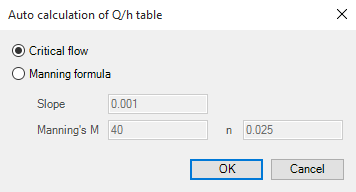
Calculate Q/h
The Q/h relation may be automatically generated by pressing this button. This button will open a new dialog, illustrated below on Figure 12.2.
Figure 12.2 Auto calculation of Q/h-relations
The Q/h relation is computed using the characteristics of the cross section located at the boundary location, and hence a cross section must exist at this location before this tool can be used. H values in the Q/h relation are extracted from the processed data of the actual cross section whereas related Q values are computed either using the critical flow or the Manning formula. If the latter is chosen the bed slope and Manning's "n" or "M" must be specified.
In case the critical flow formula is used, Q is calculated from:
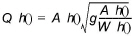
In case of uniform flow by Manning's formula, Q is calculated from:

where:
Q(h) is the level dependent discharge
A(h) is the level dependent area (from Cross section processed data)
W(h) is the level dependent width (from Cross section processed data)
I is the bed slope
Conv(h) is the level dependent conveyance calculated as a function of the resistance type defined in cross section, in the Raw data tab, as described below.
If the resistance type is set to Relative Resistance:

If the resistance type is set to Manning's M:

If the resistance type is set to Manning's n:
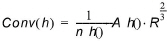
If the resistance type is set to Chezy or Darcy-Weisbach:

where:
MQhTool is the Manning number defined in the 'Auto calculation of Q/h table' dialog
M(h), n(h) and C(h) are the respective resistance numbers extracted from the Resistance column in the cross sections Processed data.
When the boundary type is set to 'Runoff', it is required to assign a solute concentration to the runoff from a selected catchment. The options below are used to select the runoff to be used in this calculation:
Include boundary
The boundary condition is applied in the simulation only if the option is checked.
Catchment name
The catchment to be used is selected from this list. Any catchment from the 'Catchment definitions' menu may be selected.
Flow type
This option is only available when the rainfall-runoff model for the selected catchment is NAM. For these catchments, the solute concentration will apply to the selected component from the rainfall-runoff model:
· Total runoff, which is the sum of overflow flow, inter flow and base flow
· Overflow flow
· Inter flow
· Base flow
· Rainfall
For other types of rainfall-runoff models than NAM, the solute concentration will always apply to the total runoff.
