Wind friction on the water surface can be accounted for by including wind shear stress in the simulation. This is done by enabling ‘Include wind shear stress’ under the Wind friction section.
The wind shear stress is included in simulations by combining the wind scaling factor(s) with a wind field defined by wind velocity and wind direction. Wind fields and scaling factors are defined in the two separate tabs described below.
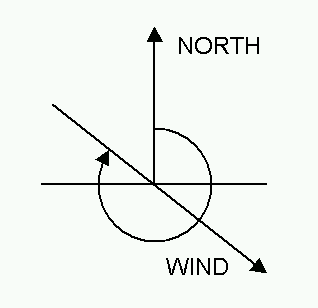
The wind field definition must be specified here with two components: the wind velocity and the wind direction. The direction is expressed in degrees in clockwise direction from north,
Figure 12.3 Definition of Wind field direction
Global value
A global wind field is applied throughout the network, unless local values have been defined. For both the wind velocity and wind direction, the options below are specified.
· Input type. Here the global value type can be set to either Constant or Time varying.
· Value. When the global value type is set to Constant, the constant value is specified here.
· File. When the global value type is set to Time varying, the time series used for the global wind field is specified here. The button to the right may be used to either browse, create, edit or plot the time series.
· Item. This field shows the selected item in the time series.
Distributed values
By using distributed wind field values it is possible to adjust the wind field to reflect local variations within the domain. Distributed values overwrite global values.
Distributed values are applied to specific reaches, defined by Branch name, Upstream chainage and Downstream chainage. Distributed values are added or deleted using the Append '+' or Delete '-' buttons above the table. As for global values, distributed values may have either a Constant or Time varying type.
The wind scaling factor is a multiplication factor which is multiplied to the wind velocity. Wind scaling factors may be defined both as a global value and as distributed values at user-defined locations (chainage points).
Global value
A global wind scaling factor is applied throughout the network, unless distributed values have been defined.
Distributed values
By using distributed wind scaling factors it is possible to adjust the wind shear stress to reflect local variations within the domain. Distributed values overwrite the global value.
Distributed values are applied at specific locations defined by Branch name and Chainage. Distributed values are added or deleted using the Append '+' or Delete '-' buttons above the table. Alternatively, distributed values can be digitised in the Map view: in Map view, open the Spatial data ribbon and select 'Wind scaling factor' from the 'Type' drop-down menu (see Figure 12.4)
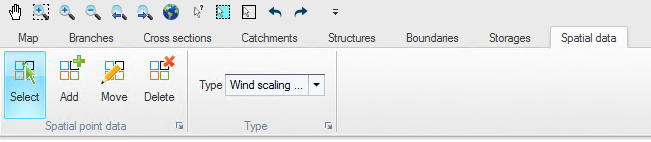
Figure 12.4 Map view ribbon for editing local Wind scaling factors
Click on the ‘Add’ button to activate creation of new scaling factor locations and click on the desired location in the river network for the local wind scaling factor. The location will automatically be added to the table of local values in the tabular view and a value may be entered. The ‘Move’ and ‘Delete’ buttons may also be used to edit the location on the map or to remove a distributed value.

Note: If two or more local values are defined in the same river branch, the intermediate value(s) will be calculated by linear interpolation.
