
The required type of Initial Condition to apply in the HD simulation is specified in the Global values section. Options available are:
· Steady State
· User defined
When ‘Steady State’ is selected, initial conditions will be based on a steady state calculation for all river branches in the model, except for river reaches and locations where local, user-defined values are defined.
When ‘User defined’ is selected, global values for initial conditions are applied as default value for computational points which are not included in eventual Hotstart files, and for which no local values have been defined.
Level type
Water level may be specified either as Water level or Water depth.
Discharge type
Discharge may be specified either as User defined flow values or to be calculated as Natural flow.
Natural flow will calculate the discharge according to a manning formula
Where:
R: Hydraulic radius
A: Flow Area
M: Manning’s number (*)
I: Water surface slope
(*): Natural flow calculation can utilise Resistance formulations from both Manning’s M or Manning’s n depending on the selected option in the ‘Hydrodynamic Parameters -> Bed resistance’ dialogue.
Local values are applied at specific locations defined by Branch name and Chainage.
Local HD initial conditions may be added to river branches by digitised in Map view: In Map view, open the Spatial data ribbon and select ‘HD Initial condition’ from the ‘Type’ drop-down menu.
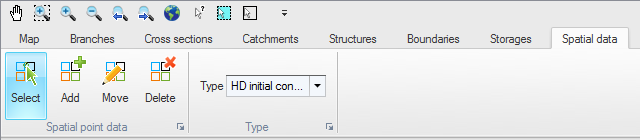
Figure 13.1 Ribbon bar for adding and editing local Initial condition locations
To insert a new location, click the ‘Add’ button and click on the desired location of the local initial condition value. The location will automatically be added to the ‘Local branch values’ table in the dialogue and the local HD initial conditions can be manually defined in the table. Initial conditions for Local values offer same options as described above for Global values.

Note: If two or more local values are defined within the same river reach, the intermediate values will be calculated by linear interpolation.
If only one local value location is defined in a river, then this value will be applied at the specific location and all other values in the river will be assigned with Global values.
Local initial water level / depth for storages can also be added, with the 'Local storage values' table. These local initial conditions to storages cannot be added from the map.
Hotstart files can be used to define initial conditions when the Global option for initial conditions has been defined as ‘User Defined’.
The HD initial conditions may be loaded from an existing result file by enabling ‘Hotstart’ and clicking on the ‘Append’ button. This will add a new row to the list of Hotstart files. Click on the ‘Browse’ button and select the required hotstart file.

Note: It is possible to define multiple hotstart files covering different or overlapping areas. If a part of the network is covered by more than one hotstart file the first hotstart file will be used. If a part of the network is not covered by the specified hotstart files the global / local values will apply.
If the network in a hotstart file differs from the current network e.g. the number of gridpoints in a branch have changed then an interpolation is used.
Use simulation start time
If ‘Use simulation start time’ is enabled, the initial condition will automatically be extracted from the Hotstart file using the simulation start date and time as specified in the ‘Simulation Period’ page
Hotstart Date and Time
The date and time at which the initial conditions are loaded from the hotstart file. If ‘Use simulation start time’ is enabled the hotstart date and time will be taken as the simulation start.
