The majority of georeferenced model features defined in MIKE HYDRO River can be exported to Shapefiles.
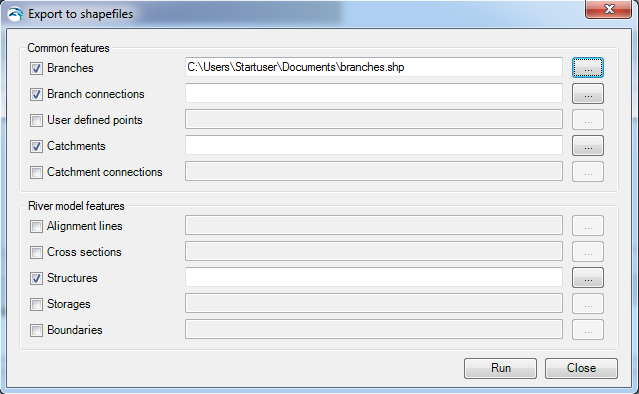
The export option is activated from the through ‘Export to Shape files' button, which opens the dialogue as presented in Figure 16.3.
Figure 16.3 Export MIKE HYDRO Data to Shapefile dialogue
The dialogue contains two groups of data; 'Common features' which are features that are also used by other modules than River, and 'River Module Features' which are module specific features used only in the specific MIKE HYDRO module.
Export the requested model data by activating the checkbox in front features that should be processed and specify a shapefile names for the individual features. Use the file selection button '…' for specifying the output shapefile names.
After completing selections and filename specifications, press the 'Run' button to execute the export of model data to shapefiles. Press 'Close' to stop the conversion or to close the dialogue.
Shapefile content from Export of MIKE HYDRO features will include the following information:
|
MIKE HYDRO features |
Shape type |
Key variables to export as shapefile attributes |
Attribute name |
Attribute type |
|---|---|---|---|---|
|
Branches |
River shapes (Polylines) |
Branch name Identifier Topo-ID Start Chainage End Chainage Flow direction Branch Type |
BR_BrName BR_ID BR_TopoID BR_StartCh BR_EndCh BR_FlowDir BR_Type |
Text Text Text Double Double Short integer Short integer |
|
Branch connections |
Connecting lines (Polyline) |
Branch name Upstr. Type Upstr. Branch name Upstr. Chainage Upstr. Storage ID Downstr. Type Downstr Branch name Downstr. Chainage Downstr. Storage ID |
BC_BrName BC_UpsType BC_UpsName BC_UpsCh BC_UpsStID BC_DwsType BC_DwsName BC_DwsCh BC_DwsStID |
Text Short integer Text Double Text Short integer Text Double Text |
|
User defined chainages |
Points |
Branch name Chainage |
UDC_BrName UDC_Ch |
Text Double |
|
Catchments |
Catchment shapes (polygons) |
Name Use Polygon Area Catchment Area Rainfall-Runoff model Branch Chainage |
Cat_Name Cat_AreSel Cat_Area Cat_RRMod Cat_BrName Cat_Ch |
Text Short integer Double Short integer Text Double |
|
Catchment connections |
Connection (Polyline) |
Catchment name Branch name Chainage Upstream Ch Downstream ch |
CC_CatName CC_BrName CC_Ch CC_UpsCh CC_DwsCh |
Text Text Double Double Double |
|
Alignment Lines |
Lines (polylines) |
Name Type |
AL_Name AL_Type |
Text Short integer |
|
Cross Sections |
Cross section lines (polylines) |
Cross section ID Branch name Topo-ID Chainage Cross section type Radius type Datum Resistance distribution Uniform resistance Left high flow resistance Low flow resistance Right high flow resistance Resistance type |
CS_ID CS_BrName CS_TopoID CS_Ch CS_Type CS_Radius CS_Datum CS_ResDist CS_Uniform CS_LeftHi CS_Low CS_RightHi CS_ResType |
Text Text Text Double Short integer Short integer Double Short integer Double Double Double Double Short integer |
|
Structures |
Stucture locations (Points) |
ID Branch name Chainage Location Type Type of structure |
Str_ID Str_BrName Str_Ch Str_Mode Str_Type |
Text Text Double Short integer Short integer |
|
Storages |
Storage locations (Points) |
ID Capacity type Initial Surface Area |
ST_ID ST_CapType ST_Area |
Text Short integer Double |
|
Boundaries (#1) |
Boundary locations (Points) |
Boundary ID Location Type Branch name Chainage Boundary Type |
BC_ID BC_LocType BC_BrName BC_Ch BC_BndType |
Text Short integer Text Double Short integer |
|
Boundaries (#2)
|
Boundary locations (Polyline)
|
Boundary ID Branch name Chainage Downstr Chainage Boundary Type |
BC_ID BC_BrName BC_Ch BC_DwsCh BC_BndType |
Text Text Double Double Short integer |
