Generic Tools
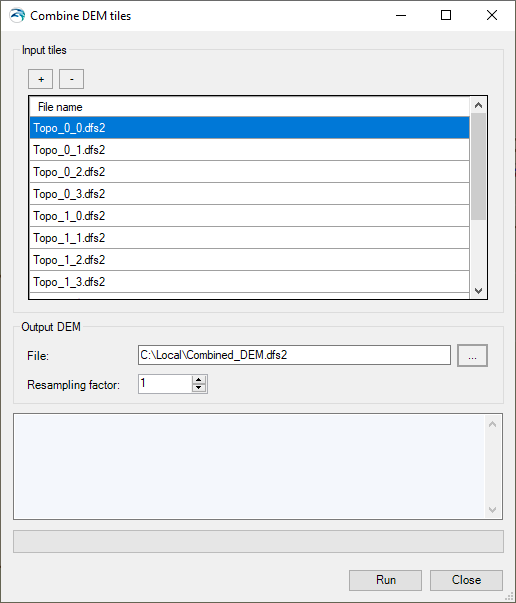
The 'Combine DEM tiles' tool is used to generate a single DEM file by combining multiple tiles together. This is especially useful when the input DEM is provided in the form of tiles and should be used in MIKE HYDRO to trace e.g. rivers or catchments, in which case the DEM data must be supplied in a single file.
Input tiles
Add or remove input tiles to be included in the final DEM file, using the '+' and '-' buttons at the top.
Supported formats are *.dfs2, *.asc, *.txt and *.tiff raster files. All input tiles must be in the same format. For *.asc and *.txt formats, the coordinates of the tiles are assumed to be expressed in the same map projection as the one being defined for the MIKE HYDRO project. For the other formats, it is obtained from the files' data.
Figure 16.5 The Combine DEM tiles tool
It is mandatory that all input tiles have the same resolution (i.e. the same cell size).
Overlapping tiles are not supported. Gaps between tiles are however allowed, in which case empty cells will be returned in the output DEM.
File
The path to the output DEM file. The output file supports *.dfs2, *.asc, *.txt and *.tiff raster file formats. This file format does not have to be the same as the input tiles' format.
Resampling factor
The resampling factor may be used to coarsen the resolution of the output DEM. The cell size of the output DEM will be equal to the input tiles' cell size times the factor. So, with a factor of 1, the output DEM will use the same cell size as the input tiles, whereas it will use larger cells with a factor higher than 1. When the resampling factor is higher than 1, the average value from all underlying cells in the input tiles is used in the output DEM.
Buttons
· Run: Creates the output DEM. When it is created, the tool offers the option to use the created file as input DEM for data processing in MIKE HYDRO.
· Close: Closes the tool.
