MIKE HYDRO includes a comprehensive shapefile conversion feature, enabling import of most georeferenced model objects stored in Shapefiles into a MIKE HYDRO model.
It is possible to import River branches, Alignment lines, Structures, Storages, boundary conditions as well as Catchment and Rainfall Runoff method from Shapefiles for the River module.
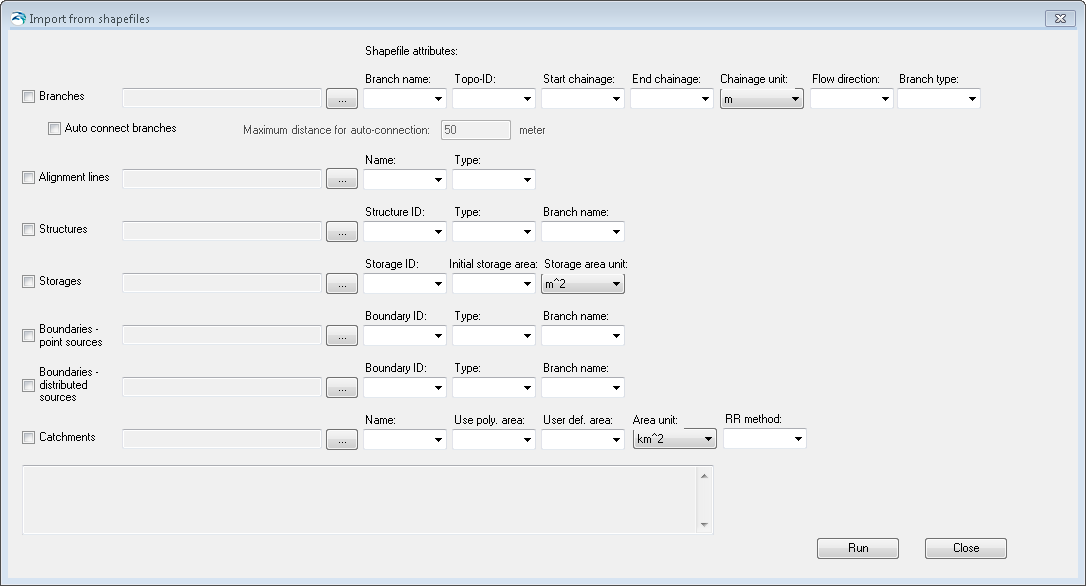
Figure 16.1 presents the dialogue for import of River model data from Shapefiles.
Figure 16.1 Import of River model features from Shapefile
To import model features from shapefile, do the following:
1. Activate the checkmark in front of the model features that should be imported (multiple features can be imported in one operation).
2. Browse and select the specific shape file using the file selection button '…'.
3. Define feature specific attributes from the shape file using the dropdown menus. Each dropdown menu will present the shape file attributes that are possible to use for the specific MIKE HYDRO feature parameter. Note: It is not required to specify all attributes in drop down menus. If some are left blank, the import utility will just assign default values for these features.
Some attributes in the shape files must be assigned specific numerical values to be recognized and imported correctly by MIKE HYDRO, as some of the features in MIKE HYDRO are defined by a numerical value rather than a string. The table below presents the attribute values for specific feature type definitions used during import from shapefile to MIKE HYDRO.
|
Feature attributes |
Options |
Values |
|---|---|---|
|
Flow direction |
Positive Negative |
0 1 |
|
Branch Type |
Regular Link Channel Kinematic Routing |
0 1 2 |
|
Alignment Type |
Left Extent Left Bank Right Bank Right Extent |
0 1 2 3 |
|
Structure Type |
Weir Culvert Pump Gate Direct Discharge Dam break Energy Loss Tabulated |
0 1 2 3 4 5 6 7 |
|
Boundary Type |
Water Level Discharge QH Relation Free Outflow Closed Rainfall Evaporation Runoff |
0 1 2 3 4 5 6 7 |
|
Use Polyl. Area |
True False |
1 0 |
|
RR method (Rainfall Runoff Model Type) |
None NAM UHM Time Area Kinematic Wave |
0 1 2 3 4 |
When selections and filename specifications are complete, press the 'Run' button to execute the import of model data from shapefiles. Press 'Close' to stop the conversion or to close the dialogue.

Note: Structures and boundaries (both point and distributed sources types) are attached to river branches in MIKE HYDRO, but imported points (for structures and point source boundaries) and polylines (for distributed source boundaries) must not necessarily be strictly superimposed to the imported branches. These objects will be inserted on the closest location on the river branch they belong to. Additionally, their chainages will be automatically computed based on this location.
