The storage capacity (Elevation - Area relationship) can be computed for reservoirs, lakes, bays and small inlets, and be used as input definition for storages or as additional storage in cross sections. The storage capacity is calculated using elevations from a DEM and spatial extents from user-defined polygons. The tool will automatically extract the area at different elevations for each polygon, and assign the obtained relationships to the relevant storages or cross sections.
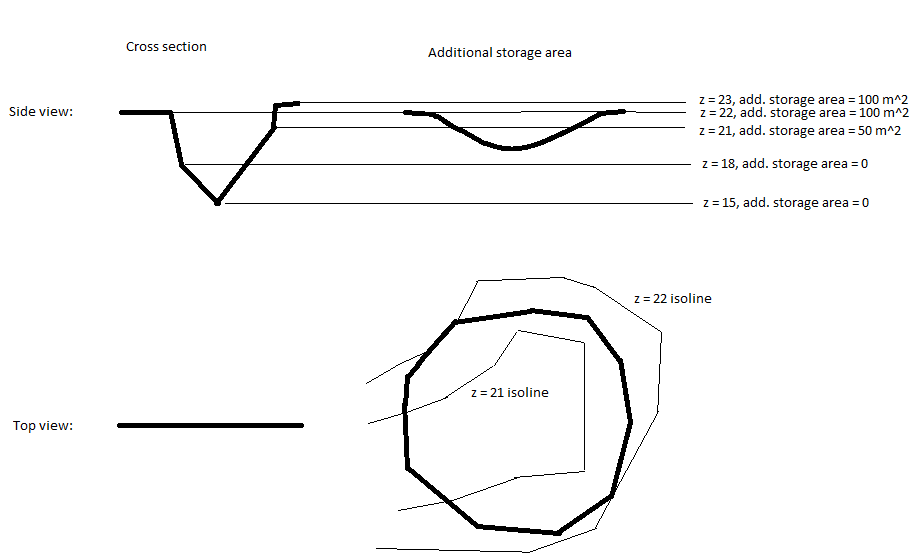
When the storage capacity is applied to cross sections, one or more polygons (representing extent of the storage area) can be assigned to the same cross section. For each level in the existing cross section's processed data, the surface area of the additional storage is calculated based on the DEM; see Figure 16.13.
Figure 16.13 Example of assigning additional storage to a cross section
When the storage capacity is applied to storages, areas are calculated at regular intervals. The lowest and highest elevations correspond respectively to the lowest and highest elevations from the DEM within the polygon. The intermediate elevations are controlled by the user-defined number of elevations being calculated.
The 'Compute storage from DEM' tool requires some initial actions from the user to enable the functionality:
· Load a shape file through the 'Background layers' page. The shape file must contain an attribute with an identifier corresponding to the storage ID, or cross section ID used in the cross section editor.
· Load a DEM through the 'Background layers' page
· Select the DEM file through the 'Digital Elevation Model (DEM)' page.
Apply elevation area relationships to
Storage area shape file
Attribute containing ID
Buttons
Apply elevation area relationships to
Select whether the computed relationships will be applied to storage definitions, or to additional storage area of cross sections.
Select the shape file that defines the additional storage area from the dropdown menu of polygon shape files included in the 'Background Layers'.
Note: Usage of shape files requires that they are specified in the 'Background layers' before opening the tool.
Select the attribute in the shape file that connects the individual polygons to a specific storage or cross section. All polygons with the same ID will be used as additional storage to the cross section. Number of elevations in relationships
This value specifies the number of equidistant elevations at which the storage areas are calculated. This value is only used for storages. Create flood map helper file
In order to properly represent the additional storage in a flooding map a 'flood map helper file' can be created. The file is a dfs2 file where areas with additional storage has the value of the cross section ID.

Note: The flood map helper file can only be created if cross section ID's are integers.
The flood map helper file can be used in connection with the 2D mapping feature in MIKE 11.
If the checkbox is enabled, it is required to specify a dfs2 file name either manually typing the entire file name or by using of the '…' file selection button.
· Close: Closes the 'Additional storage area' tool.
· Clear log: Clears the log-messages in the text box above the buttons.
· Update: Updates cross sections with additional storage area following the specifications in the dialogue window.
