Working with bridges
General
Submergence and overflow
Bridge's cross sections
When working with a bridge structure, the behavior of the overview table is different than the tables used for other structure types. With bridges, two different levels of structures are introduced:
· A primary structure, which is here called the main structure. The main structure stores information about the location only.
· A secondary structure, which is here called an opening. A main structure may have multiple openings, which describe the various apertures under the bridge. Each opening is bound to the main structure on which is has been created, and a minimum of one opening is required for each main structure.
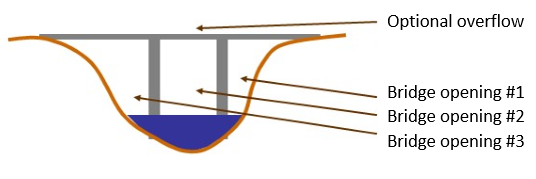
Figure 6.21 illustrates an example of bridge containing multiple openings.
Figure 6.21 Example of bridge openings
Openings are shown at a sub level of the main structure's level, in the overview table. Figure 6.22 shows the main structures (e.g. Bridge 3) and their openings (e.g. Bridge 3 Opening 2) in the overview table. The active items are indicated by the black triangles to the left of the row numbers.
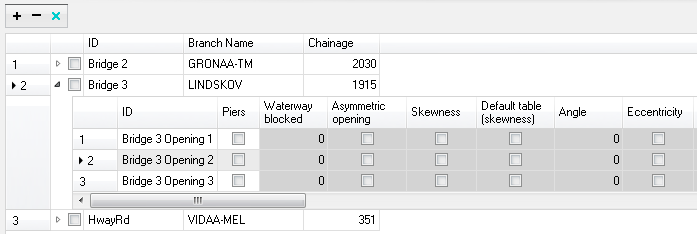
Figure 6.22 Main structures and openings in the overview table
A main structure may be added or removed by pressing respectively the '+' or '-' button above the overview table. These buttons control only the main structures but not the openings. Removing a main structure will remove all its openings as well.
An opening can be added or removed by activating the related main structure, and by use of the buttons available in the 'Multiple openings' options.
Under the General tab the following types of information may be specified.
Location
Multiple openings
Flow blockage
Free surface flow
Geometry and tables windows
Options
Piers and piles.
Asymmetric opening
Skewness
Eccentricity
Spur dykes
The location options contain a maximum of three items, which availability depends on the structure type:
ID. String identification of the main structure or opening.
Branch name. The name of the branch on which the bridge is defined. The branch name is specified only for the main structures.
Chainage. Chainage at which the bridge is located. The chainage is specified only for the main structures.
Three buttons are available to add or remove openings for the active main structure.
Add opening. This button adds a new opening with default settings.
Copy opening. This button adds a new opening being a copy of an existing opening, selected in the 'From' list. The new opening gets the same parameters as the copied one.
Remove opening. This button removes the active opening from the active main structure.
Apply flow factor
When this option is active, the total discharge computed through the bridge (i.e. the sum of discharges through the various openings) is multiplied by a flow factor. This factor's value is specified in the Flow factor field. The factor is a dimensionless factor, and a value of 1 means that no change is applied to the computed discharge. A value lower than 1 can typically be used to describe the reduction of the flow through the structure due to obstacles, like debris, restricting the flow area in the structure.
The parameters available here control the free surface flow equations applied for the active opening. The number of parameters depends on the selected method.
Method.
The method controls the equation applied to describe the free surface flow through the opening. The available methods can be divided into pure free flow methods and methods which may be combined with submergence/overflow methods. The pure free flow methods can be further subdivided into methods for piers and methods for arches. The choice of method should be based on the assumptions for the different methods and the requirements of the modelling. The available methods are:
· Energy equation: a standard step method where a backwater surface profile determination is used to calculate the discharge through the opening. The method takes the contraction and expansion loss for bridges of arbitrary shape into account. The method assumes sub-critical flow and may default to critical flow for steep water surface gradients.
· FHWA WSPRO: the Federal Highway Administration (FHWA) WSPRO method is based on the solution of the energy equation. Contraction loss is taken into account through the calculation of an effective flow length. Expansion losses are determined through the use of numerous experimentally based tables. The method takes the effect of eccentricity, skewness, wingwalls, embankment slope etc. into account through the use of these tables.
· USBPR: the US Bureau of Public Roads (USBPR) method estimates free surface flow assuming normal depth conditions. The method is based on experiments and takes the effect of eccentricity, skewness and piers into account.
· Yarnell piers: an equation derived from experiments for normal flow conditions in the sub critical flow range. The effect of piers is handled through the use of adjustment factors.
· Nagler piers: an orifice type of flow description with the effect of the piers taken into account through an adjustment factor.
· Hydraulic Research arch: the Hydraulic Research method is based on laboratory experiments of both single and multi-spanned arch bridges in rectangular channels. The method uses tables describing the relation between the blockage ratio, the downstream Froude number and the upstream water level.
· Biery and Delleur arch: an orifice type of equation is used to describe the discharge through the opening. The equation is derived under the assumption of a rectangular channel and is based on a single span arch opening. Multiple arch openings are handled by a simple multiplication factor.
Resistance type. Defines the type of resistance value specified for the opening. The type can be either Manning's M or Manning's n.
Resistance value.
The value for the resistance on the bridge structure.
This resistance value will per default apply all along the bridge's cross sections. However, if these cross sections have markers 'Left abutment' and 'Right abutment' specified, then it is assumed that the part of the cross sections in-between represents the river bed, and the resistance applied between these markers is obtained from the resistance applied to the upstream and downstream cross sections. In this case, the resistance value specified for the opening only applies from the left extent of the bridge's cross section to 'Left abutment' marker, and from 'Right abutment' marker to the right extent of the bridge's cross section.
Ratio. Selects between the channel contraction ratio (m=1-M) or bridge opening ratio (M) as parameter in the various tables.
Opening type. For the FHWA WSPRO method, the opening type describes the type of embankment and abutment, through four different types: I, II, III and IV.
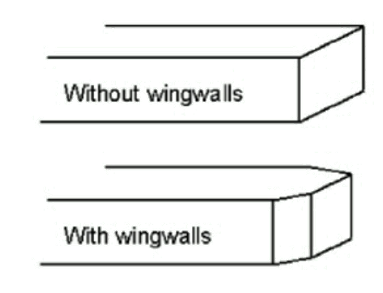
Figure 6.23 Definition sketch of opening type I (vertical embankments and vertical abutments, with or without wingwalls) (after Matthai)
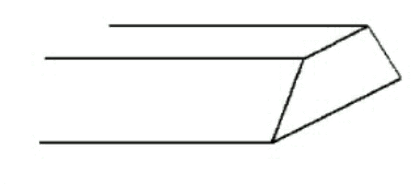
Figure 6.24 Definition sketch of opening type II (sloping embankments without wingwalls) (after Matthai)
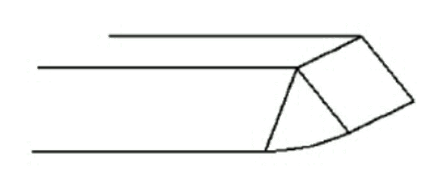
Figure 6.25 Definition sketch of opening type III (sloping embankments and sloping abutments; spillthrough) (after Matthai)
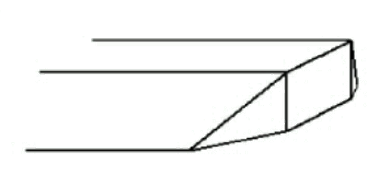
Figure 6.26 Definition sketch of opening type IV (sloping embankments and vertical abutments with wingwalls) (after Matthai)
Waterway length. Length of the waterway in the flow direction.
Level of WW length. The level at which the waterway (WW) length is measured.
Contraction loss coef. The contraction loss factor.
Expansion loss coef. The expansion loss factor.
Opening width. For an arch: opening width at the arch spring line (b, in figure below). For piers: total opening width between the piers.
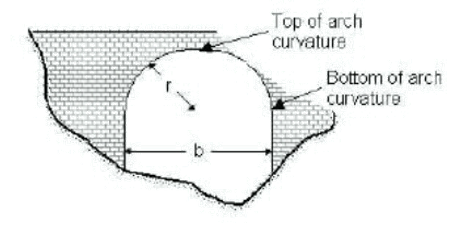
Figure 6.27 Geometrical description of an arch
Type of piers. Describes the shape of the piers:
· Squared
· Semi-circular
· Triangular
· Twin cylinder 1
· Twin cylinder 2
· Lens-shaped
Number of arches. The number of arches in the opening.
Level of bottom of arch curvature. Level of arch spring line, shown on Figure 6.27 above.
Level of top of arch curvature. Level of upper most point in the arch, shown on Figure 6.27 above.
Radius of arch curvature. Radius of the arch (r, in Figure 6.27 above).
Use default table. When this option is checked, default loss factor tables are used in the simulation. When unchecked, user-defined tables may be used, which are accessed with the 'Edit table' button.
User-defined loss tables are edited in pop-up windows, which content differs depending on the selected method. For the FHWA WSPRO method, the window also contains additional geometrical parameters.
Use default table. When this option is checked, the simulation uses the default loss table for the related item. When unchecked, the simulation uses a user-defined table, which appears in a separate tab. In this user-defined table, it is possible to add more rows and sometimes more columns, and edit the values.
Please refer to the reference manual for descriptions of variables used in the tables for the various methods.
Number of rows. For some user-defined loss tables, the number of rows is controlled by this value.
Number of columns. For some user-defined loss tables, the number of columns is controlled by this value.
Type (Entrance rounding, FHWA WSPRO method).
Entrance rounding type for opening type I with FHWA WSPRO method. Two types are available:
· Corner
· Wingwall.
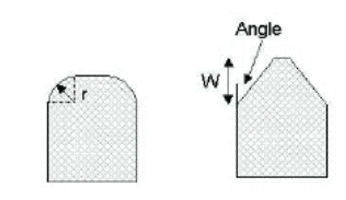
Figure 6.28 Rounding type for opening type I (Left: corner; Right: wingwall)
Radius. Radius of the corner (r, in Figure 6.28 above).
Width. Width of the wingwall (W, in Figure 6.28 above).
Angle (Entrance rounding). Angle of the corner (Angle, in Figure 6.28 above).
Embankment slope. The slope of the embankment for opening types II, III, and IV with FHWA WSPRO method. For example, use a value 2 for a 1:2 slope.
Angle (Wingwalls). Angle of the wingwall for opening type IV with FHWA WSPRO method.
Type (Base coefficient, USBPR method). The type of opening. Three types are available:
· 90° wingwall
· 45° wingwall
· Spillthrough
Additional options may be added to the free surface flow calculation. Available options depend on the selected method. To include an option, simply tick the corresponding box.
Most of the options are taken into account through the use of adjustment factors defined in tables. It is possible to either use the default tables or use user-defined tables.
Used to include the effect of piers and piles on the free surface flow calculation.
Waterway blocked. The proportion of the waterway blocked by piers/piles.
Type.
For the FHWA WSPRO method, two types are available:
· Piers
· Piles.
For the USBPR method, the following types of piers are available:
· Single cylinder
· Twin cylinder 1
· Twin cylinder 2
· Series of cylinder
· Single squared
· Twin squared 1
· Twin squared 2
· Series of squared
· Semi-circular
· Series of I-formed.
Use default table. When this option is checked, the simulation uses the default loss tables for piers and piles. When unchecked, the simulation uses user-defined tables, which are accessed in extra tabs.
Please refer to the reference manual for descriptions of variables used in the tables.
Opening type. The loss tables used for piers and piles depend on the opening type, specified in the Free surface flow options. The opening type used is therefore reminded here for reference. The opening type can only be changed from the Free surface flow parameters.
Used for individual definition of left and right abutments' properties. When this option is active, most of the opening's parameters (in the Free surface flow parameters, or in pop-up windows) have to be defined separately for the left and for the right side.
Used when the embankments are not perpendicular to the flow direction.
Angle. Angle describing the orientation of abutments.
Use default table. When this option is checked, the simulation uses the default loss table for skewness. When unchecked, the simulation uses a user-defined table, which is accessed through the 'Edit table' button.
Please refer to the reference manual for descriptions of variables used in the table.
Used when the bridge opening is eccentrically located in the river.
Use default table. When this option is checked, the simulation uses the default loss table for eccentricity. When unchecked, the simulation uses a user-defined table, which is accessed through the 'Edit table' button.
Please refer to the reference manual for descriptions of variables used in the table.
Used to include the effect of spur dykes on the free surface flow calculation.
Use default table. When this option is checked, the simulation uses the default loss tables for spur dykes. When unchecked, the simulation uses user-defined tables, which are accessed in additional tabs.
Please refer to the reference manual for descriptions of variables used in the tables.
Length. The length of the spur dyke.
Type. The type of the spur dyke, which can be either straight or elliptical.
Angle. The angle, for an elliptical spur dyke.
Offset. The offset, for a straight spur dyke.
Opening type. The loss tables used for spur dykes depend on the opening type, specified in the Free surface flow options. The opening type used is therefore reminded here for reference. The opening type can only be changed from the Free surface flow parameters.
Under the Submergence and overflow tab, it is possible to optionally include either submergence, or submergence and overflow. It is not possible to include overflow without submergence.
These options are only available in combination with the Energy equation, FHWA WSPRO or USBPR method for free surface flow calculation.
Method. The method controls the equations applied to describe the submerged flow through the opening. The choice of method should be based on the assumptions for the different methods and the requirements of the modelling. The available methods are:
· FHWA WSPRO: the Federal Highway Administration (FHWA) WSPRO method for pressure flow is based on two orifice equation descriptions. One for situations when the orifice is submerged downstream and a modified equation for situations when only the upstream part of the orifice is submerged.
· Energy equation: the flow under the opening is determined through a standard backwater step method. The flow is assumed to be in the subcritical range and thus the method may default to critical flow. Both contraction and expansion losses are taken into account.
· Culvert: a standard culvert description may be chosen for submergence flow, where the culvert is specified in the 'Culverts' page. The culvert is only active if submergence occurs.
Coefficient of discharge. The discharge coefficient in the FHWA submergence equation.
Use default table. When this option is checked, the simulation uses the default table for coefficient of discharge. When unchecked, the simulation uses a user-defined table, which is accessed with the 'Edit table' button.
Please refer to the reference manual for descriptions of variables used in the table.
Contraction loss. The contraction loss coefficient.
Expansion loss. The expansion loss coefficient.
Bridge soffit level. The soffit (underside) level of the opening.
Culvert. The ID of the selected culvert to be used, from the list of valid structures in the 'Culverts' page. The culvert must be located on the same branch and the same chainage as the bridge.
Method. The method controls the equations applied to describe the flow over the bridge. The choice of method should be based on the assumptions for the different methods and the requirements of the modelling. The available methods are:
· FHWA WSPRO: the Federal Highway Administration (FHWA) WSPRO method is based on a weir equation taking tail water submergence into account through the use of a submergence coefficient. The method may be used for both gravel and paved surfaces.
· Energy equation: the flow over the bridge is determined through a standard backwater step method. The flow is assumed to be in the subcritical range and thus the method may default to critical flow. Both contraction and expansion losses are taken into account.
· Weir: a standard weir description may be chosen for overflow, where the weir is specified in the 'Weirs' page. The weir is only active if overflow occurs.
Bridge deck level. The deck (underside) level for the opening.
Length. The length of top of embankment in the flow direction.
Use default tables for coefficient of discharge. When this option is checked, the simulation uses the default tables. When unchecked, the simulation uses user-defined tables, which are accessed with the 'Edit table' button.
Please refer to the reference manual for descriptions of variables used in the tables.
Surface. The surface of the top of the bridge, required when using default tables, and which can be of type:
· Paved
· Gravel.
Weir. The ID of the selected weir to be used, from the list of valid structures in the 'Weirs' page. The weir must be located on the same branch and the same chainage as the bridge.
Under the Bridge's cross sections tab, it is required to specify the geometry of the bridge opening, on both its upstream and its downstream side. The corresponding bridge's cross sections should describe the bottom of the opening as well as its lateral walls, and are used for the free surface flow calculation. When submergence and overflow are included, the levels of submergence and overflow are specified in the Submergence and overflow tab, and therefore don't have to be included in the bridge's cross sections.
The upstream and downstream bridge's cross sections are illustrated on Figure 6.29, representing a plan view of the bridge, respectively as sections 2 and 3. Cross sections 1 and 4 are the closest cross sections defined in the Cross sections menu.
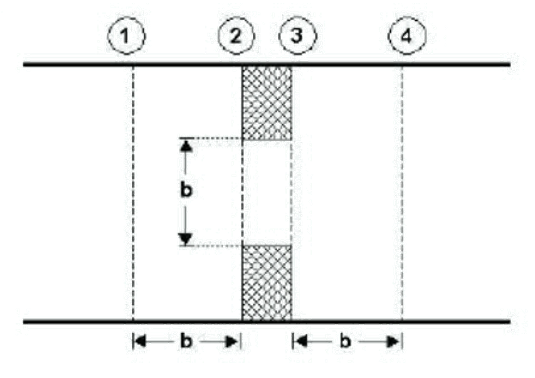
Figure 6.29 Location of up- and downstream cross sections.
The location of the cross sections outside the bridge should be so that any potential contraction or expansion loss is taken into account. In other words, the optimal location is where the stream lines are parallel prior to a contraction and post a possible expansion. As a rule of thumb, the distance between the bridge and the cross sections should be in the order of one opening width.
Upstream section, free surface flow
Downstream section, free surface flow
Graphics
Upstream section, free surface flow
The upstream cross section of the opening is defined in a table, which provides a list of points describing the topography along the lateral walls and the bottom of the opening.
The 'S' column provides the horizontal distance of each point along the cross section, from the left end of the cross section. Note that the S-values are compared to the S-values of the upstream cross section, and it is therefore important that S-values are consistent between these cross sections.
The 'Z' column provides the elevation of the points.
The 'Resist.' column provides the relative resistance in the cross section point. A factor 1 corresponds to the resistance value specified in the General tab.
The 'Marker' column may optionally contain the following markers:
· 'Left extent': defines the left extent of the active part of the cross section used for the calculation. All points of the cross section located to the left of this marker are ignored. If this marker is not defined in the cross section, it is assumed that left extent corresponds to the first point in the table.
· 'Left abutment': defines the horizontal position of the bottom of the left wall of the opening.
· 'Right abutment': defines the horizontal position of the bottom of the right wall of the opening.
· 'Right extent': defines the right extent of the active part of the cross section used for the calculation. All points of the cross section located to the right of this marker are ignored. If this marker is not defined in the cross section, it is assumed that right extent corresponds to the last point in the table.
When markers 'Left abutment' and 'Right abutment' are defined in the cross section, it is assumed that the part of the cross section between these two markers corresponds to the natural river bed, and in this case the resistance applied between these markers is obtained from the upstream and downstream cross sections. If these markers are not defined, the resistance value specified in the General tab will be uniformly applied along the bridge's cross section.
The '+' button above the table can be used to insert a new line at the bottom of the table, while the '-' button can be used to delete the active line.
Datum. A datum value may be entered here. The datum is added to all Z values in the table. The datum is normally used for adjusting the levels of the cross sections such that they conform to a specific reference datum in the model area.
Copy upstr. section. The button 'Copy upstr. section' fills in the table, by copying the S, Z and resistance values from the first cross section located upstream of the bridge. This allows to easily obtain the geometry of the upstream cross section, and manually edit this cross section afterwards to describe the geometry of the bridge.
Use default upstream sub-cross section. When the main structure contains multiple openings, the entrance loss upstream of each opening is computed using a sub-part of the upstream cross section (defined in the Cross sections page), and not using the full width of the upstream cross section. The upstream sub-cross section represents the part of the cross section where the water flows towards the active opening.
When the option 'Use default upstream sub-cross section' is checked, the upstream sub-cross section is defined automatically, based on geometrical considerations only.
When the option is unchecked, the position of the upstream sub-cross is manually defined between 'From S value' and 'To S value'.
From S value. This value represents the left horizontal extent of the upstream sub-cross section. This S value refers to the S value specified in the raw data table of the upstream cross section, defined in the Cross sections page.
To S value. This value represents the right horizontal extent of the upstream sub-cross section. This S value refers to the S value specified in the raw data table of the upstream cross section, defined in the Cross sections page.
Downstream section, free surface flow
The downstream cross section of the opening may either be defined as a copy of the upstream cross section of the bridge, in which case elevations are corrected using a longitudinal slope, or defined with its own table.
Cross section. This controls the way the downstream cross section of the bridge is defined:
· Same as upstream: the downstream cross section of the bridge is defined with data from the upstream cross section, but with a correction of elevations to take the longitudinal slope into account.
· User-defined section: the downstream cross section of the bridge is defined in its own table. Please refer to the description of the table used for the upstream cross section for more details.
Slope. The slope between the upstream and the downstream cross sections of the bridge.
Datum. A datum value may be entered here when the downstream cross section of the bridge is defined in its own table. The datum is added to all Z values in this table. The datum is normally used for adjusting the levels of the cross sections such that they conform to a specific reference datum in the model area.
Copy downstr. section. The button 'Copy downstr. section' fills in the table, by copying the S, Z and resistance values from the first cross section located downstream of the bridge. This allows to easily obtain the geometry of the downstream cross section, and manually edit this cross section afterwards to describe the geometry of the bridge.
Use default downstream sub-cross section. When the main structure contains multiple openings, the exit loss downstream of each opening is computed using a sub-part of the downstream cross section (defined in the Cross sections page), and not using the full width of the downstream cross section. The downstream sub-cross section represents the part of the cross section where the water flows from the active opening.
When the option 'Use default downstream sub-cross section' is checked, the downstream sub-cross section is defined automatically, based on geometrical considerations only.
When the option is unchecked, the position of the downstream sub-cross is manually defined between 'From S value' and 'To S value'.
From S value. This value represents the left horizontal extent of the downstream sub-cross section. This S value refers to the S value specified in the raw data table of the downstream cross section, defined in the Cross sections page.
To S value. This value represents the right horizontal extent of the downstream sub-cross section. This S value refers to the S value specified in the raw data table of the downstream cross section, defined in the Cross sections page.
Horizontal offsets. The horizontal position of the structures within the cross section are per default defined by the S values, or centred on the sub-cross sections. This position can be adjusted by use of the horizontal offset. Note that the position is used only to plot/display the structure, but the offset and this horizontal position have no impact on the simulation.
Plot/Refresh. This button opens the Structure window to plot the active opening, and its submergence and overflow levels when submergence and overflow are included. This graphical representation aims at verifying that the bridge's cross sections as well as submergence / overflow levels are valid, but e.g. the horizontal extent of submergence and overflow may not strictly represent the extents considered in the simulation. The plot also shows the other openings of the main structure with a light blue color.
