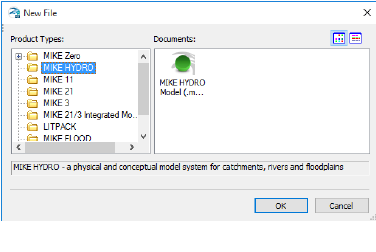
To create a new document, start MIKE Zero and choose the MIKE HYDRO model document type from the MIKE HYDRO group.
Figure 3.2 Create new MIKE HYDRO document
Press the ‘OK’ button and an empty document will be created and the setup wizard will automatically open.
The wizard will guide you through setting the framework of your project:
· On the ‘Modules’ page define the model type to ‘River’.
· On the ‘Description’ page define the title to ‘River Tutorial’. The title will set the default name of your result files.
· On the ‘Coordinate system’ page keep both the map and feature coordinate system to Sphere Mercator (default).
· On the ‘Background map’ page set the background map to Google map.
· On the ‘Background layers’ and ‘Working area’ pages press next without specifying anything.
The framework is now in place, so next save the setup to a MIKE HYDRO file.
