In case you have geographical information in your input data file, you can superimpose on the plot geographical coordinates either as projection coordinates or as latitudes and longitudes. Furthermore, you have the opportunity to add plotting symbols indicating true north and the convergence, defining the angle between the longitude and the projection northing line. The indications of true north and convergence can be moved later, directly on the picture, using the Popup Menu.
When you are superimposing a coordinate system, the one specified in the Map Projection "Type" box will be used. The default projection is the one specified in your input data file.
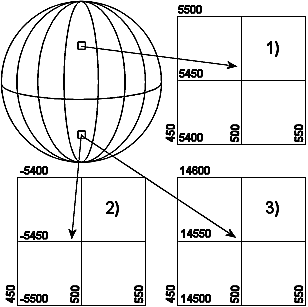
If you select Northing coordinates always positive, The northing coordinates will be as 1) and 3) in Figure 2.2. If you don't select it, the southern hemisphere northing coordinates will be as 2).
Figure 2.2 Illustration of UTM-zone
Finally, you can specify additional axis annotation and a geodetic scale. If the data is defined using LONG/LAT the scaling is not available.
Choosing automatic scaling will show the scale on the plot according how you size the plot manually. Choosing a defined scale, ex. 1:100000, will automatically size the plot according to that scale.
