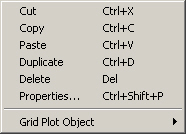
You can create, select and edit plot objects in the Plot Composer by using shortcut keys.
These keys provide quick access to fuctions listed on menus or in dialog boxes. If a function can be completed using shortcut keys, the keys are listed on the menu next to the function, as shown in Figure 1.1.
Figure 1.1 Shortcut keys for functions in Edit Menu
A list of availabe shortcut keys in Plot Composer is given in Table 1.1.
|
Function |
Shortcut Keys |
|---|---|
|
Copy plot object |
Ctrl+C |
|
Cut plot object |
Ctrl+X |
|
Delete plot object |
Del |
|
Dublicate plot object |
Ctrl+D |
|
Activate plot object Properties dialog |
Ctrl+Shift+P |
|
Ctrl+I |
|
|
New window for AVI creation |
Ctrl+A |
|
Paste plot object |
Ctrl+V |
|
Ctrl+M |
|
|
Ctrl+B |
